From a World Target to the Crew's Pack
Work recorded: August 16, 2026
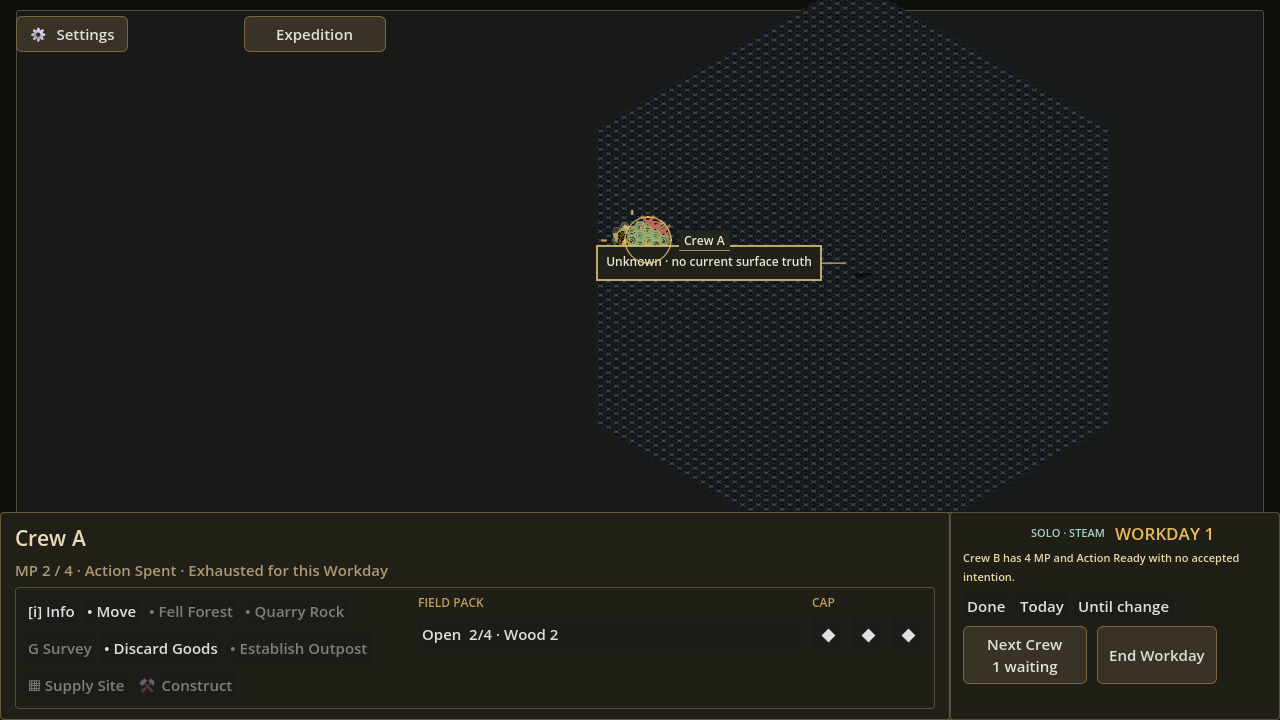
Action Spent, MP 2 / 4, and Wood 2 in Crew A's own Field Pack; the surrounding sequence records the targeted forest source being removed.A map command needs to explain its result
In Frontier Logistics, a Crew is an expedition unit the player selects and directs on the world map. Each physical Crew has movement points for travel and one material Field Action for the Workday. Its Pack is the four-cell inventory carried by that exact Crew.
The individual parts of a field command are not enough on their own. If selecting a Crew, choosing an action, identifying a target, approving it, changing the world and receiving the material do not read as one chain, a valid click can still feel disconnected from its result.
This development snapshot brings those steps onto the same visible path.
Select, target, approve, receive
The sequence begins by selecting a Crew directly on the map. Its workspace shows whether the Field Action is ready, which actions are available, why other actions are blocked and how much room remains in its Pack.
Choosing Fell changes the interface into an explicit target state. Empty terrain produces different feedback from a legal forest target, so the player can tell whether the pointer is inspecting the world or authoring an action. After the legal target is approved, the forest source is removed and Wood 2 appears in the selected Crew's Pack. The same sequence was exercised with Quarry: approving a rock target removes that source and places Stone 2 in the acting Crew's Pack.
The important result is not only that the map changed. The world source, spent Field Action and cargo all point back to the same Crew and the same committed result.
The acting Crew becomes part of the choice
Because a Crew has one material Field Action per Workday, Fell and Quarry are not free map edits. Approving either action changes that Crew to Action Spent, while its remaining movement points stay visible separately.
That makes the player choose more than a resource tile. The player is also choosing which Crew spends the Workday's field action, which Pack must have room and which Crew will carry the Wood or Stone afterward. A second Fell in the recorded journey kept the result in the same Crew's Pack rather than moving it into a generic expedition inventory.
Two views, one expedition state
Strategic 2D is the map-first view used to read routes, positions and targets. Diorama 3D is a closer three-dimensional presentation of the same expedition, not a separate simulation.
After the Quarry result, the recorded journey switched from Strategic 2D to Diorama 3D and back. The same Crew remained selected, the same world revision remained committed and the same Stone stayed in that Crew's Pack. Changing the presentation did not create a second version of the action or its custody.
What to inspect in this frame
The attached frame records the first committed Fell result. Crew A remains selected in the lower workspace. Its Field Action reads Action Spent, movement remains at MP 2 / 4, and the Field Pack shows Wood 2 with two cells still open. These values make the action cost and exact cargo owner readable together.
The frame documents state and custody, not input timing. In this development build, some approved commands can still pause before their visible result appears. Response time, controls, wording and presentation remain in development.